Google Earth it!
Using GeoJavascript, you can very easily collect a pair of coordinates and launch Google Earth to view the location. This is in addition to the functionality that is already in place called, "Google Map it!". Here's what you do...
1. Create a folder-level .js file in your ACROBAT_INSTALL/JavaScripts folder and copy the following code in to it. Download the file from here.
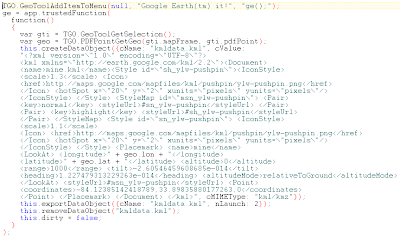 2. Open up your GeoPDF file and select the GeoTool, then right-click and select the TerraGo context menu.
3. Choose the newly created Google Earth it! option.
If the stars are aligned properly, Google Earth should open and it should zoom to the location you had selected with the GeoTool.
** Please note, if Google Earth is not your default 'KML' viewer on your Windows system, it will open the app that is associated with 'KML' files.
Please refer to this earlier article with more information on how to do this and thanks again to JB Freels for putting all this together. There is a LOT of cool stuff we can do with GeoJavascript. More to come!
Labels: Customization, GeoJavascript, Google Earth
posted by Adam Estrada at 3:08 PM
|
17 comments


